
GoldenOTT

Is Reselling IPTV Subscriptions a Profitable Online Business Model?

Reselling IPTV subscriptions can be profitable, but returns depend on your margin per customer, customer retention, and support workload. The model requires little setup, yet it demands consistent service and customer care, and it works best with a dependable, properly licensed provider.

An IPTV Reseller Service lets you sell streaming access without operating servers or managing infrastructure. However, the business involves purchasing credits, setting prices, answering inquiries, and maintaining satisfaction across monthly renewals.

This article examines how reselling works, the role of a reseller panel, the sources of profit and the factors that reduce it, how to evaluate a provider, and why licensing matters.

Key Takeaways

  • The profit is the difference between the cost of the credit and the selling price, subtracting your expenses.
  • Customer retention is more important than single purchases as customers will bring continuous income over months.
  • Support, marketing, and payment costs can shrink margins, so plan for them when setting prices.
  • A dependable provider and panel protect your reputation more than chasing the lowest credit price.
  • Confirm that your provider holds proper content rights and check local rules before you invest.

How IPTV Reselling Works

A reseller buys credits from a main provider and uses them to create customer accounts. A credit commonly covers one month of service for one customer, although the exact structure differs by provider.

You set the retail price, collect payment, and answer customer questions. The provider runs the streaming infrastructure.

What an IPTV OTT Reseller Panel Does
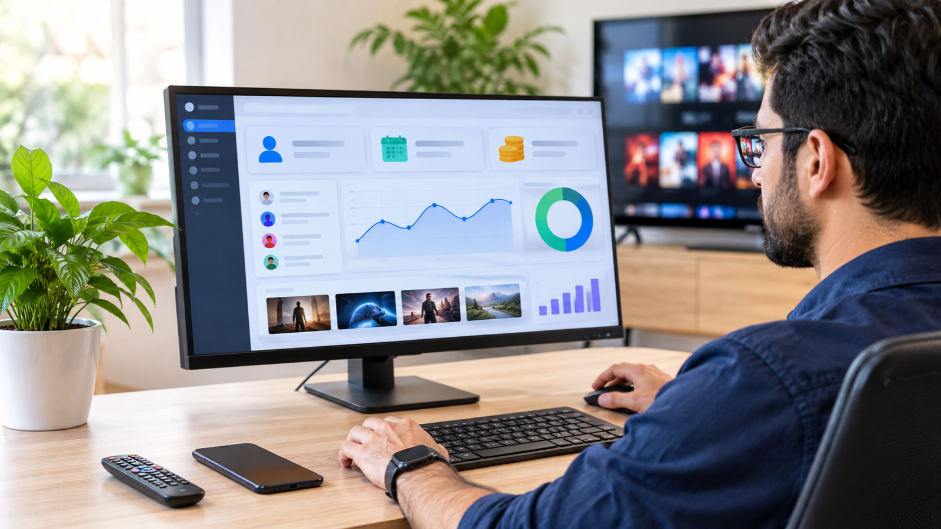
IPTV OTT reseller panel dashboard

The panel is your control room, where your daily tasks happen. Features vary by provider, but most panels let you:

  • Create, renew, and deactivate customer accounts, so each customer’s access matches what they have paid for at any given time.
  • Track your credit balance and expiry dates, so you know when to buy more credits and when customers should renew.
  • Generate login details or playlists for customers, so new buyers can set up their devices and start watching after payment.
  • Monitor active users, so you can spot unusual activity, answer questions, and see how many customers are using the service.

A clear panel saves hours every week. A confusing one turns small tasks into daily frustration, so test it first.

Where the Profit Comes From

Your margin is the retail price minus the credit cost. Here is a simple monthly example for one customer, with numbers chosen only for illustration.

Item

Example

Credit cost per customer

$4

Monthly price you charge

$9

Margin per customer

$5

Margin from 40 customers

$200 before expenses

Advertising, hosting, and payment fees come out of that figure, so actual profit is lower than the margin shown. Build your own numbers from your provider’s rates and your expenses.

What Can Reduce Your Profit

Revenue is only part of the picture. Several costs and risks can narrow your margin.

  • Churn: Customers who leave after one month force you to keep finding new ones.
  • Support time: Setup help and troubleshooting add hours your price should cover.
  • Provider downtime: Repeated outages lead to refunds and complaints.
  • Marketing costs: Reaching new customers costs money, time, or both.
  • Payment fees: Card fees reduce what you keep from each sale.

How to Choose an IPTV Reseller Service Provider

Compare providers on substance, not just price, because the cheapest credits rarely help if streams fail or support goes quiet.

  • Clear credit pricing, with written terms on how long credits stay valid, so you can plan costs and avoid surprises.
  • Stable streaming that you have tested on several devices, since smooth playback is what keeps customers renewing month after month.
  • Support that answers resellers promptly, because you will need quick help whenever a customer reports a problem you cannot solve.
  • A small starter bundle, so you can test the service with a few real customers first, before you scale up.
  • A live demo of the IPTV OTT Reseller Panel before you buy in bulk, so you can judge its usability.

A provider that meets these points gives you a solid base. Next, turn that choice into a practical launch plan.

A Simple Plan for Your First 90 Days

Once you have chosen a provider, a clear sequence keeps early mistakes small.

  1. Research: Compare a few providers and read their terms.
  2. Test: Buy a small bundle and try the panel and streams on several devices.
  3. Price: Work out your margin using your real costs.
  4. Launch: Begin with a small group of customers so you can fix problems early.
  5. Review: After three months, check renewals, support hours, and complaints before buying more credits.

Each step gives you real data before you spend more. Next, consider the qualities that keep a reseller business running.

Qualities That Help Resellers Last

Credits are easy to buy, but lasting success depends on how you treat customers. These four habits are worth building early.

  • Patience: Trust builds slowly, and renewals follow reliable service.
  • Responsiveness: Customers expect quick answers when a stream stops working.
  • Honesty: Clear descriptions and fair prices lead to fewer disputes.
  • Comfort with tech: You will explain setup steps on different devices.

These habits build customer trust. Equally important is the legal side, which you should review before investing.

Check Licensing and Local Rules First

Laws on distributing TV content differ by country. Reselling a service without proper rights can create legal and financial risk, whatever the price.

Ask your provider to confirm its licensing and consider speaking with a legal adviser.

Conclusion

So, is reselling IPTV subscriptions profitable? It can be, when your margin covers your costs, your customers renew, and your provider delivers steady service. The numbers only work when you account for support time, marketing, and payment fees, and when customers stay long enough to make each sale worthwhile. It is a real business with real work, not a shortcut to easy income.

If you are weighing an IPTV Reseller Service, start small, test the panel, run your own numbers, and confirm licensing before you commit to credit bundles. Treat the first few months as a learning period, and let renewal data guide your decision. At Goldenott, we believe resellers grow best on honest pricing, dependable service, and clear expectations.

FAQs

Is IPTV reselling profitable?

It certainly can. The profitability will depend on your margin per client, renewals, support burden, and expenses like marketing costs. The outcome is not guaranteed, so do the math for yourself before buying credits.

How does an IPTV reseller make money?

To summarize, a reseller purchases credits from a provider at a wholesale cost and sells them to consumers for more. The net result after deducting costs becomes profit.

What is a reseller panel?

Reseller Control Panel is a dashboard where you can manage your customers’ accounts, manage credits, manage renewals, and manage users. Different control panels offer different options, so please check it out before purchasing.

How much money do I need to start?

Costs will be influenced by your credit packages and your marketing strategy. It is advisable to start with small credit bundles as you conduct the trial. Check with the providers if the credits expire.

Is it legal to resell IPTV subscriptions?

It really depends upon which country you are in as well as whether the online service you are using is properly licensed. You should ask your provider for confirmation and read the agreement yourself.

Take the Next Step Toward Smarter Reselling

Run your own numbers, test the panel with a small starting bundle, and confirm licensing first. Get in touch today to discuss your goals and find the right fit.


How Does an IPTV Reseller Panel Work for Beginners?

A reseller panel is an online dashboard where you buy credits from a provider and spend them to create customer accounts. You set the price, the provider supplies the streaming service, and the panel tracks every account, renewal, and expiry date.

For anyone new to the business, an IPTV Panel for Resellers can look technical at first. In practice, it works like the back office of an online shop. You hold a balance, create accounts for paying customers, and watch dates and activity from one screen. Understanding each part before you buy saves time and money.

This guide covers how credits work, what you can do inside the dashboard, key terms in plain language, how to judge a provider, common beginner mistakes, and why licensing deserves attention.

Key Takeaways

  • Credits are the balance you buy from a provider and spend to create customer accounts.
  • You set prices, so your profit is the gap between price and your credit cost.
  • The dashboard handles accounts, renewals, and expiry dates, while the provider handles the streaming service.
  • Features differ between providers, so test the panel with a small bundle before buying more.
  • Always confirm that your provider holds proper content rights before you start selling to customers.

How an IPTV Reseller Panel Works From Credit to Customer

The process follows a simple loop that repeats with every new customer.

  1. Buy credits: Purchase a bundle from your provider. A credit commonly covers one month of service for one customer, though structures differ.
  2. Log in: Open the dashboard and check your balance, available plans, and settings.
  3. Create an account: Choose the plan length and enter the customer’s details. The dashboard deducts the matching credits automatically.
  4. Share access: Send the customer login details or a playlist link so they can set up their device.
  5. Manage renewals: Renew accounts before they expire, spending more credits and keeping the customer informed.

Once you have done this a few times, the loop becomes routine. The real work is finding customers and keeping them satisfied.

A First Customer Walkthrough

Two friends setting up a customer account on a laptop

Suppose a friend asks for a one-month account. You log in, create a new account, select a one-month plan, and add your friend’s details. The dashboard deducts one credit and produces login details, which you send over.

Say that credit costs you $5 and you charged $11. Your margin is $6 before expenses such as payment fees and marketing. These numbers are for illustration only, so use your provider’s real rates.

What You Can Do Inside the Dashboard

A well-designed dashboard puts your daily tasks in one place. Features vary by provider, but most dashboards let you:

  • Create, renew, and deactivate customer accounts.
  • Check your credit balance and see how credits were spent.
  • View expiry dates and active users.
  • Generate login details or playlists for customers.
  • Manage sub-resellers, where the provider supports it.

Treat this as a typical list rather than a guarantee. Ask a provider to show you the dashboard before you commit to a large purchase.

Key Terms in Plain Language

Panel guides use a lot of jargon. This table explains the words you will meet most often.

Term

What It Means

Credit

A unit of balance, commonly worth one month for one customer

Account or line

One customer’s active login

Connection

How many devices can stream at once on one account

Expiry date

The day an account stops working unless renewed

Sub reseller

A seller who works under you using part of your credits

Learning these five terms makes provider websites far easier to read and helps you ask better questions before buying.

How to Judge an IPTV Reseller Platform Before You Buy

Not every provider offers the same experience, so compare a few before choosing one.

  • Dashboard clarity: Look for a layout that makes common tasks quick, so you spend less time on admin.
  • Credit pricing: Prefer clear rates and written terms on how long credits remain valid.
  • Stream stability: Test the service yourself on several devices, since reliability protects your reputation.
  • Support: Send a question before buying and note how quickly and clearly the provider replies.
  • Terms: Ask the provider to explain its content rights and refund rules in writing.

A trustworthy IPTV Reseller Platform will welcome these checks instead of rushing you into a large order.

Common Beginner Mistakes

Most early problems come from a handful of habits that are easy to avoid once you know them, so review this list before you spend.

  • Buying too many credits before you have proof that customers will pay your price.
  • Setting prices without calculating your credit cost and the expenses that come with selling.
  • Forgetting renewal dates, which leaves customers without service and costs you repeat sales.
  • Skipping a test of the streams on your own devices, so you find problems only after customers do.
  • Ignoring support messages, since slow replies are a common reason customers leave.

Starting small and keeping simple records solves most of these issues.

Licensing and Responsibility

The dashboard itself is only software. What matters just as much is the content behind it. Laws on distributing TV content differ by country, and reselling a service without proper rights can create legal and financial risk.

Ask your provider to confirm its licensing, and consider speaking with a legal adviser before you invest. This is general information, not legal advice.

Conclusion

An IPTV Reseller Panel is a simple idea once the terms are clear. You buy credits, turn them into customer accounts, and use the dashboard to track renewals and activity. The technology is rarely the hard part. Pricing, support, and trust decide whether a reseller business lasts, because customers stay with sellers who answer quickly, deliver steady streams, and keep their promises.

Start with a small bundle, test every feature, and confirm licensing before you grow. Keep simple records, review your numbers each month, and add credits only when renewals justify it. Treat early results as lessons, not verdicts, and adjust steadily. At Goldenott, we believe beginners succeed when they understand each step first and make decisions with clear information.

FAQs

What is a reseller panel in IPTV?

It is an online dashboard where you buy credits, create and manage customer accounts, and track renewals. The provider supplies the streaming service while you handle pricing, customers, and support.

How do credits work in a reseller panel?

You buy a bundle of credits and spend them when you create or renew an account. A credit commonly equals one month for one customer, but structures vary by provider.

Do I need technical skills to use a panel?

Basic computer skills are usually enough, because the provider manages the streaming infrastructure. You mainly create accounts, track dates, and support customers, so test the dashboard to confirm it feels simple.

What is a sub-reseller?

A sub-reseller is a seller who works under you using part of your credits. Not every provider supports this feature, so check the terms before planning around it.

Is reselling IPTV legal?

It depends on your country and on whether the service has proper content rights. Ask your provider to confirm licensing and consider speaking with a legal adviser before you start.

Ready to Start Your Reselling Journey?

Review the terms, test the dashboard with a small bundle, and confirm licensing first. Get in touch today to discuss your goals and find the right fit.

How Many Devices Can You Use with One IPTV Subscription?

Most providers let you install an app on as many devices as you like, but limit how many can stream at once, often between one and five connections. Check the connection count on any plan before you pay for it.

Picture a Friday evening. One person wants the match, another is catching up on a drama, and a teenager is watching highlights on a tablet. If your IPTV Subscription USA plan allows only one stream at a time, someone ends up waiting. Finding the right plan for your home starts with knowing how many screens will play together.

In this article, we cover how connections work, typical limits, how to count what your household needs, internet speed requirements, ways to add more connections, and habits that keep streams stable.

Key Takeaways

You can usually install the app on many devices, but each plan limits simultaneous streams.

Connection counts differ by provider and plan, so confirm the exact number before you pay.

Count the screens that play at the same time, not every device in your home.

Each extra stream needs more bandwidth, so test your internet speed before adding more screens.

Closing idle apps on unused devices frees up connections and helps you avoid limit errors.

Installed Devices vs Simultaneous Streams

Two limits often get mixed up. One is how many devices can hold your login. The other is how many can play at the same moment, which is your connection count.

Most providers do not restrict installation, so your TV, phone, tablet, and laptop can all carry the same login. Every plan includes three connections, which means up to three devices can stream at the same time. A fourth stream usually shows an error until another stops.

How Many Connections Do IPTV Plans Usually Include?

Every plan includes 3 connections, so up to 3 devices can watch at once. Use the table below to see how those three connections fit different households.

Connections in Use Typical Household Example Use
01 One viewer A single TV in the living room
02 Couple or roommates Main TV plus a bedroom screen
03 Small family Parents on the TV, a child on a tablet

A Premium IPTV Subscription in USA includes the same 3 connections, so you can plan your viewing around three devices at a time.

Two Households, Two Different Answers

Two-household IPTV connection comparison

A couple who watch together rarely need more than two connections, one for the main TV and a spare for the bedroom. The third connection lets one person watch something different on a phone.

A family of four often has three screens active on weeknights, so three connections fit them well. When relatives visit overnight, the family can take turns on the three connections, or one viewer can pause so another can start.

What to Check Before Buying an IPTV Subscription USA Plan

Start with your viewing habits rather than the plan list, because your real routine decides how many connections you need.

  • Peak viewing: Count how many screens play at once on your busiest evening.
  • Daytime use: A background TV during work still counts as a connection.
  • Device types: Confirm it works on the phones, tablets, and TVs your family uses.
  • Guests: If visitors often stay, leave room for one extra stream.
  • Plan details: Read the connections listed on the pricing page instead of assuming.

Matching these answers to a plan is how you land on the Perfect IPTV Package in USA for your home without paying for unused connections.

How Much Internet Speed Do Multiple Streams Need?

Every active stream draws from your home connection. As a rough guide, an HD stream often needs around 5 to 10 Mbps, while 4K can need 25 Mbps or more. Requirements vary by app and quality, so treat these figures as estimates.

Multiply that by the screens playing together, then leave room for video calls and downloads. A wired cable connection to the main TV is usually steadier than WiFi.

What If You Need More Connections?

You have a few options when your current plan falls short, and the right choice depends on your household size.

  • Upgrade the plan: Moving to a tier with more connections is the simplest fix, as long as the new tier covers your busiest viewing evening.
  • Add a connection: Some providers sell extra slots for an existing plan. Ask whether yours does and what the cost would be before you commit.
  • Test first: If a trial is offered, use it to see how many screens really play together, then choose a plan that matches that number.

Whichever route you choose, confirm the final connection count on the plan page. Once your plan fits, a few daily habits keep streams steady.

Habits That Prevent Connection Errors

Small routines can solve many connection limit messages, so try these simple steps first, before you consider changing your plan.

  • Close the app on idle devices, since some apps keep a session open.
  • Stop playback before changing rooms so the slot frees up.
  • Share your login only with people in your household.
  • If a limit message appears, stop every stream, then start one device at a time.

Most of these habits take seconds and cost nothing. If the errors keep returning, your household may simply need a plan with more connections.

Conclusion

The number of devices you can use comes down to simultaneous streams, not the number of screens in your home. Install the app wherever you like, but pick a plan whose connection count matches your busiest viewing hour. Count the screens that play together on a typical evening, add one for guests, and compare that number with what each plan includes before you pay.

When you compare any IPTV Subscription USA option, ask about connections, check your internet speed, and read the provider terms carefully. A little planning now saves you from error messages and awkward evenings later on. At Goldenott, we believe a clear answer to the device question makes viewing calmer and more enjoyable for every household member.

FAQs

How many devices can I use with one IPTV plan?

You can usually install the app on many devices, but the plan sets how many streams you can have at once. Connection limits commonly range from one to five, so check your plan details.

Can I install the app on more devices than my plan allows?

Usually yes. The limit applies to simultaneous streams, not installations. You can keep the app on every device and simply watch on as many as your connection count allows.

What happens when too many devices stream at once?

The extra stream is typically refused or shows a connection limit error. Stop playback on one device, then start the new one, or upgrade to a plan with more connections.

How much internet speed do I need for multiple streams?

Add up what each screen needs. HD often takes 5 to 10 Mbps and 4K around 25 Mbps, so three HD streams may need roughly 15 to 30 Mbps.

Can I add more connections later?

Many providers allow it, either by moving to a higher plan or adding an extra connection. Availability depends on the provider, so ask about the process and cost before you buy.

Ready to Find the Right Plan for Your Home?

Count the screens your household uses at once, then choose a plan with that many connections. Get in touch today and find the right fit for your home.

WhatsApp